先说这东西解决什么
中式宴请的座次是门玄学。谁坐主位,谁坐主宾右手,谁该在三宾位——排错一个位置,饭桌上的气氛就不对了。以前要么在纸上画圈画半天,要么干脆凭感觉摆,最后总有人被安排得不太舒服。
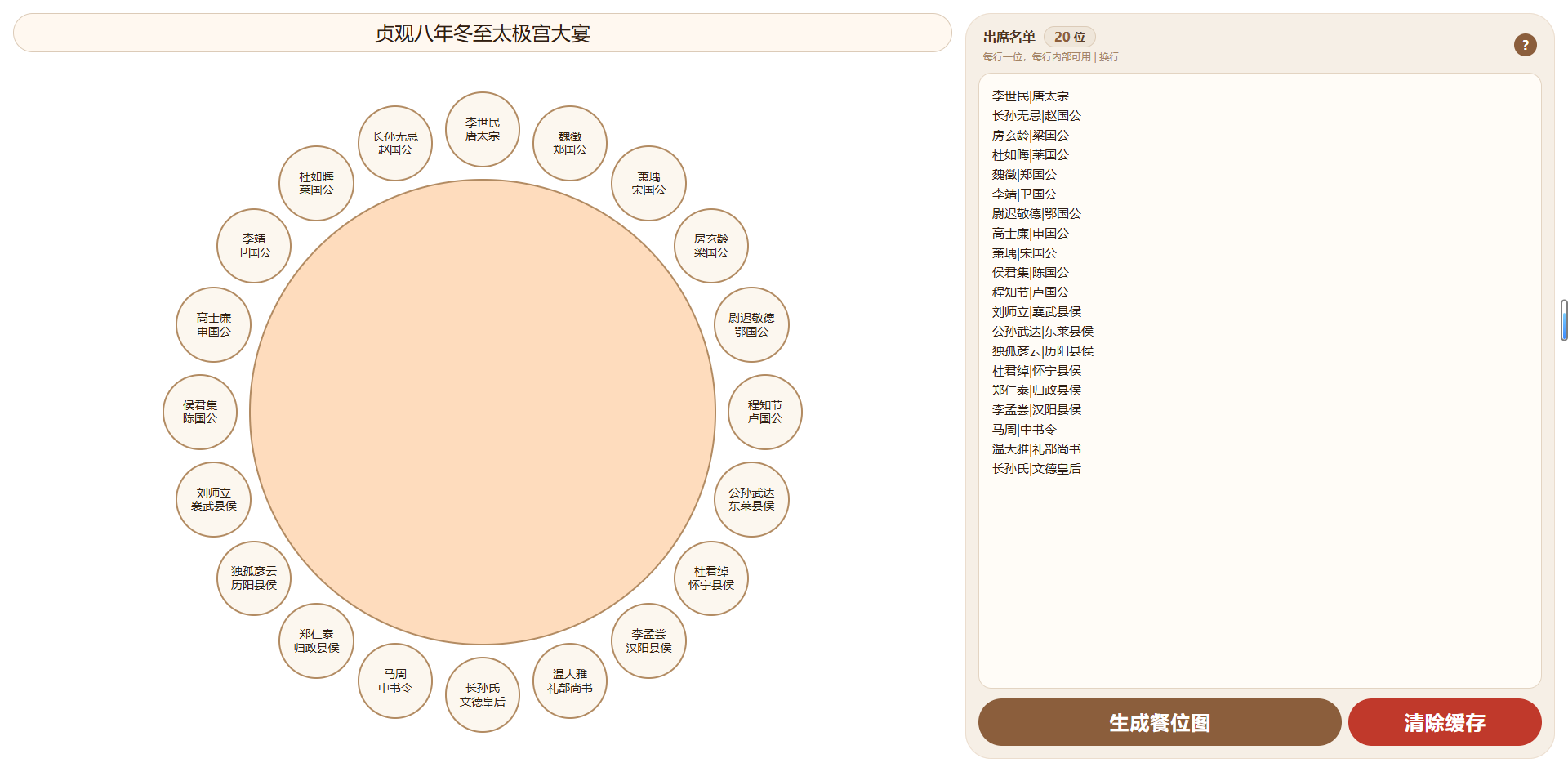
吾爱破解上有位坛友 xyxy1111 甩了个单文件 HTML 出来,就干这一件事:把名单粘进去,自动给你排好圆桌座次,还能拖拽微调。整个工具就是一个 HTML 文件,没有后端,没有依赖,双击打开就能用。
怎么用
左边填接待名称,比如「9月28日中秋宴请」。右边文本框粘名单,一行一个人:
张三|总经理
李四|副总经理
王五
赵六
那个竖线是自己加的,用它分隔姓名和职务,餐位上会显示成上下两行。空行会自动忽略,不会白占座位。右侧顶部实时显示「XX位」,不用自己数。
点「生成餐位图」,座位就出来了。餐位圆的大小和字号跟着人数动态算,人多了自动缩小,不会糊成一团。
排布规则是按中式礼仪来的
- 第一位坐 12 点钟方向,也就是主位
- 第二位在主位右手边,第三位在左手边
- 第四位在第二位右手边,第五位在第三位左手边
- 左右交替往两边排,直到排完
也就是说名单的第一个名字最尊贵,后面按顺序往外扩散。这跟常见的「主陪右手边是主宾」那套逻辑是对得上的。
排完不满意可以直接拖
两种拖法。把一个人拖到另一个餐位正中间,目标会变成金边浅黄底,松手两人换位。拖到餐位两侧的橙色加号热区上(热区只在拖拽时才冒出来),这个人会插进那个位置,后面的依次顺移。
所有调整自动存下来,下次打开还是你摆的那个顺序。
几个实用细节
数据存在浏览器的 localStorage 里,关掉页面再开还在。但也意味着只在当前浏览器有效,清缓存、换电脑、无痕模式都读不到——排好的图建议截图存档,发给同事或者打印。
布局会跟着屏幕比例变:宽屏左右分栏,竖屏自动转成上下堆叠。餐位间距固定 1rem,圆桌边缘留白也是 1rem,横竖都能看。
改名单的话,直接在右边文本框编辑再点一次生成,会按新名单重排——注意这会覆盖掉你之前拖拽的位置。只改接待名称不会影响座位。
如果人数超过 15 个,圆和字都会缩得比较小,但拖拽还是能用的。
源码
<!DOCTYPE html>
<html lang="">
<head>
<meta charset="UTF-8">
<meta name="viewport" content="width=device-width, initial-scale=1.0, user-scalable=no">
<title>中式圆桌餐位排布系统</title>
<style>
* {
box-sizing: border-box;
font-family: system-ui, "Segoe UI", Roboto, 'Helvetica Neue', sans-serif;
user-select: none;
-webkit-user-select: none;
-webkit-touch-callout: none;
}
html, body {
height: 100%;
}
body {
background: #fff;
margin: 0;
padding: 0;
overflow: hidden;
-webkit-tap-highlight-color: transparent;
}
.app {
width: 100%;
height: 100dvh;
background: #fff;
box-shadow: 0 20px 40px rgba(0, 0, 0, 0.12);
padding: 1rem;
display: flex;
flex-direction: column;
gap: 1rem;
}
.main-panel {
display: flex;
flex-direction: row;
gap: 1rem;
flex: 1;
min-height: 0;
overflow: hidden;
}
.left-column {
flex: 2;
min-width: 0;
display: flex;
flex-direction: column;
gap: 1rem;
min-height: 0;
}
.title-input {
width: 100%;
font-size: 1.5rem;
font-weight: 500;
text-align: center;
padding: 0.5rem 1rem;
background: #fff8f0;
border: 1px solid #dccbb8;
border-radius: 3rem;
color: #2e1e12;
outline: none;
transition: 0.15s;
flex: 0 0 auto;
}
.table-area {
flex: 1;
min-height: 0;
padding: 2rem;
display: flex;
justify-content: center;
align-items: center;
overflow: hidden;
}
.round-table {
position: relative;
background: #fedcbd;
border-radius: 50%;
box-sizing: content-box;
border: 2px solid #b28b62;
}
.seat-container {
position: absolute;
inset: 0;
border-radius: 50%;
pointer-events: none;
font-size: 1rem;
overflow: visible;
}
.seat {
position: absolute;
background: #fcf7ef;
border-radius: 50%;
display: flex;
align-items: center;
justify-content: center;
text-align: center;
font-weight: 400;
color: #2d1f12;
border: 2px solid #b28b62;
pointer-events: auto;
cursor: grab;
transition: 0.1s ease;
word-break: break-word;
padding: 4px;
line-height: 1.2;
box-sizing: border-box;
transform: scale(1);
z-index: 10;
user-select: none;
overflow: hidden;
touch-action: none; /* 关键:禁止浏览器默认触摸滚动/缩放 */
}
.seat.dragging {
opacity: 0.7;
cursor: grabbing;
z-index: 100;
border: 3px solid #b28b62;
scale: 1.1;
}
.seat.drop-target {
border: 4px solid #e6b422;
background: #ffeeb5;
}
.seat.touch-dragging {
opacity: 0.9;
z-index: 200;
box-shadow: 0 8px 20px rgba(0, 0, 0, 0.35);
transform: scale(1.1);
pointer-events: none; /* 让手指下方能命中其他元素 */
}
/* ============ 插入热区 ============ */
.insert-hotspot {
position: absolute;
width: 28px;
height: 28px;
margin-left: -14px;
margin-top: -14px;
border-radius: 50%;
background: #ffaa33;
border: 2px solid #fff;
opacity: 0;
pointer-events: none;
transition: opacity 0.12s, transform 0.12s;
z-index: 50;
display: flex;
align-items: center;
justify-content: center;
color: #fff;
font-size: 16px;
font-weight: 900;
line-height: 1;
box-shadow: 0 2px 6px rgba(0,0,0,0.25);
}
.seat-container.dragging-active .insert-hotspot {
opacity: 0.55;
pointer-events: auto;
cursor: pointer;
}
.insert-hotspot.hover {
opacity: 1 !important;
transform: scale(1.35);
background: #ff7b00;
}
.list-area {
flex: 1.2;
min-width: 0;
background: #f6efe6;
border-radius: 2rem;
padding: 1rem;
box-shadow: inset 0 0 0 1px #ebddce;
display: flex;
flex-direction: column;
min-height: 0;
gap: 12px;
}
.list-header {
display: flex;
justify-content: space-between;
align-items: center;
padding: 0 6px;
flex: 0 0 auto;
gap: 0.5rem;
flex-wrap: wrap;
}
.list-header-left {
display: flex;
flex-direction: column;
gap:4px;
flex-wrap: wrap;
}
.list-header-top-row{
display:flex;
align-items: baseline;
gap:10px;
}
.list-header h3 {
margin: 0;
font-size: 1rem;
color: #4f3624;
font-weight: 600;
}
.list-header .hint {
font-size: 12px;
color: #a48466;
font-weight: 400;
}
.person-count-badge {
display: inline-flex;
align-items: center;
gap: 4px;
background: #efe6da;
border: 1px solid #dccbb8;
padding: 2px 12px;
border-radius: 2rem;
font-size: 14px;
font-weight: 600;
color: #5a3e2b;
white-space: nowrap;
}
.person-count-badge .count-number {
font-size: 1rem;
font-weight: 800;
color: #8b5e3c;
}
.help-btn{
background:#8b5e3c;
color:#fff;
border:none;
width:28px;
height:28px;
border-radius:50%;
font-weight:bold;
cursor:pointer;
font-size:16px;
display:flex;
align-items:center;
justify-content:center;
padding:0;
}
.help-btn:active{
background:#6d472c;
}
.person-textarea {
width: 100%;
flex: 1;
min-height: 0;
background: #fffcf7;
border: 1px solid #e3d4c2;
border-radius: 1rem;
padding: 1rem;
font-size: 15px;
font-weight: 500;
color: #2e1e12;
line-height: 1.6;
resize: none;
outline: none;
transition: 0.1s;
font-family: inherit;
}
.person-textarea:focus {
border-color: #b88a5c;
box-shadow: 0 0 0 3px rgba(184, 138, 92, 0.15);
background: #fffdfa;
}
.button-row {
display: flex;
gap: 8px;
flex: 0 0 auto;
width: 100%;
}
.generate-btn, .clear-btn {
border: none;
border-radius: 3rem;
padding: 14px;
font-size: 1.5rem;
font-weight: 700;
color: #fff;
letter-spacing: 1px;
cursor: pointer;
}
.generate-btn {
flex: 2;
background: #8b5e3c;
}
.clear-btn {
flex: 1;
background: #c0392b;
}
.clear-btn:active {
background: #a93226;
}
/* 弹窗样式 */
.modal-overlay{
position:fixed;
inset:0;
background:rgba(0,0,0,0.55);
display:none;
align-items:center;
justify-content:center;
z-index:9999;
padding:1rem;
}
.modal-overlay.show{
display:flex;
}
.modal-box{
background:#fff;
border-radius:1.5rem;
max-width:520px;
width:100%;
max-height:80vh;
overflow:auto;
padding:1.5rem;
color:#2e1e12;
}
.modal-box h4{
margin-top:0;
font-size:1.2rem;
color:#4f3624;
}
.modal-close{
margin-top:1rem;
width:100%;
padding:10px;
border-radius:2rem;
border:none;
background:#8b5e3c;
color:#fff;
font-size:16px;
cursor:pointer;
}
/* ==================== 窄屏适配 ==================== */
[url=home.php?mod=space&uid=945662]@media[/url] (max-aspect-ratio: 1/1) {
body {
overflow: auto;
}
.app {
height: auto;
min-height: 100dvh;
overflow: visible;
}
.main-panel {
flex-direction: column;
flex: none;
overflow: visible;
}
.left-column {
flex: none;
width: 100%;
}
.table-area {
flex: none;
width: 100%;
height: auto;
min-height: 0;
aspect-ratio: 1 / 1;
max-height: 70vh;
padding: 1.5rem;
}
.list-area {
flex: none;
width: 100%;
min-height: 240px;
}
.person-textarea {
min-height: 180px;
}
.generate-btn, .clear-btn {
font-size:1rem;
}
}
</style>
</head>
<body>
<div class="app">
<div class="main-panel">
<div class="left-column">
<input type="text" id="dinnerName" class="title-input" placeholder="例如:9月28日中秋宴请" value="9月28日中秋宴请">
<div class="table-area" id="tableArea">
<div class="round-table" id="roundTable">
<div class="seat-container" id="seatContainer"></div>
</div>
</div>
</div>
<div class="list-area">
<div class="list-header">
<div class="list-header-left">
<div class="list-header-top-row">
<h3>出席名单</h3>
<span class="person-count-badge">
<span class="count-number" id="personCountDisplay">0</span>位
</span>
</div>
<span class="hint">每行一位,每行内部可用 | 换行</span>
</div>
<button class="help-btn" id="helpBtn">?</button>
</div>
<textarea id="personTextarea" class="person-textarea" placeholder="请输入人员姓名,每行一个,例如: 张三|总经理 李四|副总经理"></textarea>
<div class="button-row">
<button class="generate-btn" id="generateBtn">生成餐位图</button>
<button class="clear-btn" id="clearBtn">清除缓存</button>
</div>
</div>
</div>
</div>
<!-- 帮助弹窗 -->
<div class="modal-overlay" id="helpModal">
<div class="modal-box">
<h4 style="width:100%;text-align:center;">圆桌餐位排布系统 使用说明</h4>
<div style="font-size:0.9em;line-height:1.8em;">
<p><b>名单录入</b><br>每行一位;行内可以使用 | 符号进行换行。</p>
<p><b>生成餐位</b><br>填写接待名称和出席名单后,点击【生成餐位图】按钮,自动按中式圆桌礼仪排座。规则如下:<br>
  第一位:坐在圆桌正上方(12 点钟方向,主位);<br>
  第二位:在第一位的右手边(从主位面向圆桌中心时,右手方向);<br>
  第三位:在第一位的左手边;<br>
  第四位:在第二位的右手边;<br>
  第五位:在第三位的左手边;<br>
  以此类推,左右交替排列,直至所有人就座。</p>
<p><b>调整座位</b><br>电脑端:鼠标拖拽座位到另一个座位中心 = 交换;<br>    拖曳到座位之间的橙色 <span style="display:inline-block;background:#ffaa33;color:#fff;border-radius:50%;width:1.5em;line-height:1.5em;text-align:center;font-weight: 900;">+</span> 上 = 插入移位。<br>手机端:长按座位进行拖拽,同样支持交换/插入。</p>
<p><b>数据保存与重置</b><br>点击【生成餐位图】按钮后,数据保存在浏览器本地缓存,刷新页面不会丢失。<br>
点击【清除缓存】按钮会清空全部已保存的数据,不可恢复。</p>
</div>
<button class="modal-close" id="modalCloseBtn">关闭</button>
</div>
</div>
<script>
(function() {
let dinnerName = '未命名接待';
let personCount = 0;
let persons = [];
let seatOrder = [];
const dinnerNameInput = document.getElementById('dinnerName');
const personCountDisplay = document.getElementById('personCountDisplay');
const personTextarea = document.getElementById('personTextarea');
const generateBtn = document.getElementById('generateBtn');
const clearBtn = document.getElementById('clearBtn');
const seatContainer = document.getElementById('seatContainer');
const roundTable = document.getElementById('roundTable');
const tableArea = document.getElementById('tableArea');
const helpBtn = document.getElementById('helpBtn');
const helpModal = document.getElementById('helpModal');
const modalCloseBtn = document.getElementById('modalCloseBtn');
let dragSeatIndex = -1;
let dragPersonIdx = -1;
// 仅桌面拖拽使用
let dropTargetSeatIndex = -1;
let dropInsertSide = null;
// 触摸拖拽状态
let touchDragging = false;
let touchDragSeatEl = null;
let touchStartX = 0;
let touchStartY = 0;
let touchLongPressTimer = null;
let touchCurrentHoverEl = null; // 当前手指悬停的高亮元素(座位或热区)
let touchMovedEnough = false; // 是否已移动足够距离(用于区分长按与滚动)
const LONG_PRESS_MS = 250; // 长按阈值
const MOVE_TOLERANCE = 10; // 长按前允许的手指抖动像素
const SEAT_GAP_REM = 1;
const SEAT_TABLE_GAP_REM = 1;
const MIN_SEAT_D = 28;
const MAX_SEAT_D = 120;
const FONT_SIZE_FACTOR = 0.2;
const MIN_FONT_SIZE = 8;
const MAX_FONT_SIZE = 14;
function getRootFontSize() {
return parseFloat(getComputedStyle(document.documentElement).fontSize) || 16;
}
function getPersonsFromTextarea() {
const text = personTextarea.value;
const lines = text.split(/\r?\n/);
return lines.filter(line => line.trim() !== '').map(line => line.trim());
}
function setPersonsToTextarea(personsArray) {
personTextarea.value = personsArray.join('\n');
}
function updatePersonCountDisplay() {
const currentPersons = getPersonsFromTextarea();
personCountDisplay.textContent = currentPersons.length;
}
function formatNameForDisplay(name) {
if (!name) return '空位';
const escaped = name
.replace(/&/g, '&')
.replace(/</g, '<')
.replace(/>/g, '>')
.replace(/"/g, '"')
.replace(/'/g, ''');
return escaped.replace(/\|/g, '<br>');
}
function saveToLocal() {
const currentPersons = getPersonsFromTextarea();
persons = currentPersons;
personCount = persons.length;
const data = {
dinnerName: dinnerNameInput.value.trim() || '未命名接待',
persons: persons,
seatOrder: [...seatOrder]
};
localStorage.setItem('roundTableData', JSON.stringify(data));
}
function loadFromLocal() {
const raw = localStorage.getItem('roundTableData');
if (!raw) return false;
try {
const data = JSON.parse(raw);
if (data.dinnerName) dinnerNameInput.value = data.dinnerName;
if (Array.isArray(data.persons)) {
persons = data.persons.map(p => String(p));
}
setPersonsToTextarea(persons);
personCount = persons.length;
updatePersonCountDisplay();
if (Array.isArray(data.seatOrder) && data.seatOrder.length === personCount) {
const used = new Set();
let valid = true;
for (let i = 0; i < data.seatOrder.length; i++) {
const val = data.seatOrder[i];
if (val === -1) continue;
if (val < -1 || val >= persons.length || used.has(val)) {
valid = false;
break;
}
used.add(val);
}
if (valid) {
seatOrder = data.seatOrder.slice();
} else {
autoArrangeSeats();
}
} else {
autoArrangeSeats();
}
return true;
} catch (e) {
console.warn('读取localStorage失败', e);
return false;
}
}
function autoArrangeSeats() {
const n = personCount;
if (n <= 0) {
seatOrder = [];
return;
}
const order = new Array(n).fill(-1);
const m = persons.length;
const seq = [];
seq.push(0);
let leftHandSide = 1;
let rightHandSide = n - 1;
let turn = 0;
while (seq.length < n) {
if (turn === 0) {
if (rightHandSide >= 0 && !seq.includes(rightHandSide)) {
seq.push(rightHandSide);
rightHandSide--;
}
turn = 1;
} else {
if (leftHandSide < n && !seq.includes(leftHandSide)) {
seq.push(leftHandSide);
leftHandSide++;
}
turn = 0;
}
if (seq.length > n * 2) break;
}
for (let i = 0; i < m; i++) {
if (i >= seq.length) break;
const seatIdx = seq[i];
order[seatIdx] = i;
}
seatOrder = order;
}
function calculateLayout(n) {
if (n <= 0) {
return { seatDiameter: 64, fontSize: 14, tableDiameter: 200, seatCenterRadius: 120 };
}
const rootFontSize = getRootFontSize();
const gapPx = SEAT_GAP_REM * rootFontSize;
const tableGapPx = SEAT_TABLE_GAP_REM * rootFontSize;
const areaRect = tableArea.getBoundingClientRect();
const style = getComputedStyle(tableArea);
const padLeft = parseFloat(style.paddingLeft) || 0;
const padRight = parseFloat(style.paddingRight) || 0;
const padTop = parseFloat(style.paddingTop) || 0;
const padBottom = parseFloat(style.paddingBottom) || 0;
let availW = areaRect.width - padLeft - padRight;
let availH = areaRect.height - padTop - padBottom;
if (availW <= 0 || availH <= 0) {
availW = 400;
availH = 400;
}
const availDiameter = Math.min(availW, availH);
const tableAreaRadius = availDiameter / 2;
const numerator = (2 * Math.PI * tableAreaRadius) / n - gapPx;
const denominator = Math.PI / n + 1;
let D_max_by_area = numerator / denominator;
D_max_by_area = Math.min(D_max_by_area, tableAreaRadius - tableGapPx);
let D = Math.min(MAX_SEAT_D, Math.max(MIN_SEAT_D, D_max_by_area));
let fontSize = D * FONT_SIZE_FACTOR;
fontSize = Math.min(MAX_FONT_SIZE, Math.max(MIN_FONT_SIZE, fontSize));
let R = Math.max(0, tableAreaRadius - tableGapPx - D);
let seatCenterRadius = R + tableGapPx + D / 2;
let tableDiameter = R * 2;
return {
seatDiameter: D,
fontSize: fontSize,
tableDiameter: tableDiameter,
seatCenterRadius: seatCenterRadius
};
}
function applyLayout(layout) {
roundTable.style.width = layout.tableDiameter + 'px';
roundTable.style.height = layout.tableDiameter + 'px';
}
function renderSeats() {
const n = seatOrder.length;
if (n === 0) {
seatContainer.innerHTML = '';
return;
}
const layout = calculateLayout(n);
applyLayout(layout);
const { seatDiameter, fontSize, tableDiameter, seatCenterRadius } = layout;
const containerSize = tableDiameter;
const centerX = containerSize / 2;
const centerY = containerSize / 2;
const offset = seatCenterRadius;
let html = '';
// 先绘制插入热区
for (let i = 0; i < n; i++) {
const angleDeg = -90 + (i * 360) / n;
const angleRad = angleDeg * Math.PI / 180;
const angleNext = (-90 + ((i + 1) % n) * 360 / n) * Math.PI / 180;
const anglePrev = (-90 + ((i - 1 + n) % n) * 360 / n) * Math.PI / 180;
const midAngleNext = (angleRad + angleNext) / 2;
const hsNextX = centerX + offset * Math.cos(midAngleNext);
const hsNextY = centerY + offset * Math.sin(midAngleNext);
const midAnglePrev = (angleRad + anglePrev) / 2;
const hsPrevX = centerX + offset * Math.cos(midAnglePrev);
const hsPrevY = centerY + offset * Math.sin(midAnglePrev);
html += `<div class="insert-hotspot" data-target-seat="${i}" data-side="after"
style="left:${hsNextX}px; top:${hsNextY}px;">+</div>`;
html += `<div class="insert-hotspot" data-target-seat="${i}" data-side="before"
style="left:${hsPrevX}px; top:${hsPrevY}px;">+</div>`;
}
// 再绘制座位
for (let i = 0; i < n; i++) {
const angleDeg = -90 + (i * 360) / n;
const angleRad = angleDeg * Math.PI / 180;
const x = centerX + offset * Math.cos(angleRad);
const y = centerY + offset * Math.sin(angleRad);
const personIdx = seatOrder[i];
let rawName = '空位';
if (personIdx !== -1 && personIdx < persons.length && persons[personIdx].trim() !== '') {
rawName = persons[personIdx].trim() || '匿名';
} else {
rawName = '空位';
}
const isEmpty = (personIdx === -1 || personIdx >= persons.length || !persons[personIdx]?.trim());
const displayHtml = isEmpty ? '空位' : formatNameForDisplay(rawName);
const finalFontSize = isEmpty ? Math.max(9, fontSize * 0.75) : fontSize;
const colorStyle = isEmpty ? 'color: #a28c78; font-weight:400;' : '';
html += `<div class="seat" data-seat-index="${i}" data-person-index="${personIdx}"
style="left: ${x}px; top: ${y}px; width: ${seatDiameter}px; height: ${seatDiameter}px;
margin-left: ${-seatDiameter/2}px; margin-top: ${-seatDiameter/2}px;
font-size: ${finalFontSize}px; ${colorStyle}"
draggable="true">${displayHtml}</div>`;
}
seatContainer.innerHTML = html;
// 绑定桌面拖拽事件
document.querySelectorAll('.seat').forEach(seatEl => {
seatEl.addEventListener('dragstart', handleDragStart);
seatEl.addEventListener('dragend', handleDragEnd);
seatEl.addEventListener('dragover', handleDragOver);
seatEl.addEventListener('drop', handleDrop);
seatEl.addEventListener('dragleave', handleDragLeave);
seatEl.addEventListener('drag', (e) => e.preventDefault());
// 绑定触摸事件
seatEl.addEventListener('touchstart', handleTouchStart, { passive: false });
seatEl.addEventListener('touchmove', handleTouchMove, { passive: false });
seatEl.addEventListener('touchend', handleTouchEnd, { passive: false });
seatEl.addEventListener('touchcancel', handleTouchEnd, { passive: false });
});
// 绑定插入热区(桌面 + 触摸)
document.querySelectorAll('.insert-hotspot').forEach(hs => {
hs.addEventListener('dragover', handleHotspotDragOver);
hs.addEventListener('dragleave', handleHotspotDragLeave);
hs.addEventListener('drop', handleHotspotDrop);
});
}
// ----- 插入热区(桌面)事件 -----
function handleHotspotDragOver(e) {
e.preventDefault();
e.stopPropagation();
e.dataTransfer.dropEffect = 'move';
document.querySelectorAll('.insert-hotspot').forEach(h => h.classList.remove('hover'));
e.currentTarget.classList.add('hover');
}
function handleHotspotDragLeave(e) {
e.currentTarget.classList.remove('hover');
}
function handleHotspotDrop(e) {
e.preventDefault();
e.stopPropagation();
const hs = e.currentTarget;
const targetSeatIndex = parseInt(hs.dataset.targetSeat, 10);
const side = hs.dataset.side;
document.querySelectorAll('.insert-hotspot').forEach(h => h.classList.remove('hover'));
if (dragSeatIndex === -1 || targetSeatIndex === undefined) {
clearHighlights();
return;
}
if (targetSeatIndex === dragSeatIndex) {
clearHighlights();
return;
}
performInsert(dragSeatIndex, targetSeatIndex, side);
}
// ----- 通用:执行插入 -----
function performInsert(fromIndex, targetSeatIndex, side) {
const dragValue = seatOrder[fromIndex];
let newOrder = [...seatOrder];
newOrder.splice(fromIndex, 1);
let insertPos;
if (side === 'after') {
insertPos = targetSeatIndex + 1;
} else {
insertPos = targetSeatIndex;
}
if (fromIndex < insertPos) {
insertPos--;
}
newOrder.splice(insertPos, 0, dragValue);
seatOrder = newOrder;
renderSeats();
saveToLocal();
clearHighlights();
dragSeatIndex = -1;
dragPersonIdx = -1;
dropTargetSeatIndex = -1;
dropInsertSide = null;
seatContainer.classList.remove('dragging-active');
}
// ----- 通用:执行交换 -----
function performSwap(indexA, indexB) {
const temp = seatOrder[indexA];
seatOrder[indexA] = seatOrder[indexB];
seatOrder[indexB] = temp;
renderSeats();
saveToLocal();
clearHighlights();
dragSeatIndex = -1;
dragPersonIdx = -1;
dropTargetSeatIndex = -1;
dropInsertSide = null;
seatContainer.classList.remove('dragging-active');
}
function repositionSeats() {
renderSeats();
}
function generateSeating() {
dinnerName = dinnerNameInput.value.trim() || '未命名接待';
persons = getPersonsFromTextarea();
personCount = persons.length;
updatePersonCountDisplay();
autoArrangeSeats();
renderSeats();
saveToLocal();
}
function clearCache() {
if (!confirm('确定要清除已保存的数据吗?此操作不可撤销。')) {
return;
}
localStorage.removeItem('roundTableData');
dinnerNameInput.value = '未命名接待';
persons = [];
personCount = 0;
seatOrder = [];
setPersonsToTextarea(persons);
updatePersonCountDisplay();
seatContainer.innerHTML = '';
roundTable.style.width = '';
roundTable.style.height = '';
alert('缓存已清除');
}
// ----- 桌面拖拽事件 -----
function handleDragStart(e) {
const seatEl = e.target.closest('.seat');
if (!seatEl) return;
const seatIndex = parseInt(seatEl.dataset.seatIndex, 10);
const personIdx = parseInt(seatEl.dataset.personIndex, 10);
dragSeatIndex = seatIndex;
dragPersonIdx = personIdx;
e.dataTransfer.effectAllowed = 'move';
e.dataTransfer.setData('text/plain', `seat-${seatIndex}`);
seatEl.classList.add('dragging');
clearHighlights();
seatContainer.classList.add('dragging-active');
}
function handleDragEnd(e) {
const seatEl = e.target.closest('.seat');
if (seatEl) seatEl.classList.remove('dragging');
clearHighlights();
dragSeatIndex = -1;
dragPersonIdx = -1;
dropTargetSeatIndex = -1;
dropInsertSide = null;
seatContainer.classList.remove('dragging-active');
document.querySelectorAll('.insert-hotspot').forEach(h => h.classList.remove('hover'));
}
function handleDragOver(e) {
e.preventDefault();
e.dataTransfer.dropEffect = 'move';
if (e.target.closest('.insert-hotspot')) return;
const targetSeat = e.target.closest('.seat');
if (!targetSeat) return;
const targetSeatIndex = parseInt(targetSeat.dataset.seatIndex, 10);
if (targetSeatIndex === dragSeatIndex) return;
clearHighlights();
const rect = targetSeat.getBoundingClientRect();
const centerX = rect.left + rect.width / 2;
const centerY = rect.top + rect.height / 2;
const mouseX = e.clientX;
const mouseY = e.clientY;
const dx = mouseX - centerX;
const dy = mouseY - centerY;
const dist = Math.sqrt(dx * dx + dy * dy);
const seatRadius = rect.width / 2;
if (dist < seatRadius * 0.7) {
targetSeat.classList.add('drop-target');
dropTargetSeatIndex = targetSeatIndex;
dropInsertSide = 'swap';
}
}
function handleDragLeave(e) {
const targetSeat = e.target.closest('.seat');
if (targetSeat && !targetSeat.classList.contains('dragging')) {
targetSeat.classList.remove('drop-target');
}
}
function handleDrop(e) {
e.preventDefault();
const targetSeat = e.target.closest('.seat');
if (!targetSeat || dragSeatIndex === -1) {
clearHighlights();
return;
}
const targetSeatIndex = parseInt(targetSeat.dataset.seatIndex, 10);
if (targetSeatIndex === dragSeatIndex) {
clearHighlights();
return;
}
if (dropTargetSeatIndex === targetSeatIndex && dropInsertSide === 'swap') {
performSwap(dragSeatIndex, targetSeatIndex);
} else {
clearHighlights();
dragSeatIndex = -1;
dragPersonIdx = -1;
dropTargetSeatIndex = -1;
dropInsertSide = null;
seatContainer.classList.remove('dragging-active');
document.querySelectorAll('.insert-hotspot').forEach(h => h.classList.remove('hover'));
}
}
// ----- 触摸事件 -----
function handleTouchStart(e) {
// 只处理单指
if (e.touches.length !== 1) return;
const seatEl = e.target.closest('.seat');
if (!seatEl) return;
// 阻止默认(浏览器会滚动或长按菜单)
e.preventDefault();
const touch = e.touches[0];
touchStartX = touch.clientX;
touchStartY = touch.clientY;
touchMovedEnough = false;
touchDragSeatEl = seatEl;
// 启动长按计时器
clearTimeout(touchLongPressTimer);
touchLongPressTimer = setTimeout(() => {
startTouchDrag(seatEl, touch.clientX, touch.clientY);
}, LONG_PRESS_MS);
}
function handleTouchMove(e) {
if (e.touches.length !== 1) return;
const touch = e.touches[0];
// 如果还没进入拖拽模式
if (!touchDragging) {
// 判断是否移动超过容忍值,超过则取消长按
const dx = touch.clientX - touchStartX;
const dy = touch.clientY - touchStartY;
const dist = Math.sqrt(dx * dx + dy * dy);
if (dist > MOVE_TOLERANCE) {
touchMovedEnough = true;
clearTimeout(touchLongPressTimer);
}
return;
}
// 已进入拖拽模式:阻止默认,更新手指位置
e.preventDefault();
updateTouchHover(touch.clientX, touch.clientY);
}
function handleTouchEnd(e) {
clearTimeout(touchLongPressTimer);
if (!touchDragging) {
touchDragSeatEl = null;
return;
}
// 拖拽结束
e.preventDefault();
const touch = e.changedTouches[0];
finishTouchDrag(touch.clientX, touch.clientY);
}
// 开始触摸拖拽
function startTouchDrag(seatEl, x, y) {
if (touchDragging) return;
touchDragging = true;
const seatIndex = parseInt(seatEl.dataset.seatIndex, 10);
dragSeatIndex = seatIndex;
dragPersonIdx = parseInt(seatEl.dataset.personIndex, 10);
// 视觉反馈
seatEl.classList.add('touch-dragging');
seatContainer.classList.add('dragging-active');
clearHighlights();
// 轻微震动反馈(如果设备支持)
if (navigator.vibrate) {
navigator.vibrate(15);
}
// 立即判断一次手指下的目标
updateTouchHover(x, y);
}
// 更新手指悬停高亮
function updateTouchHover(x, y) {
// 清除之前的悬停高亮
if (touchCurrentHoverEl) {
if (touchCurrentHoverEl.classList.contains('insert-hotspot')) {
touchCurrentHoverEl.classList.remove('hover');
} else if (touchCurrentHoverEl.classList.contains('seat')) {
touchCurrentHoverEl.classList.remove('drop-target');
}
touchCurrentHoverEl = null;
}
// 用 document.elementFromPoint 获取手指下的元素
// 注意:正在拖拽的座位设置了 pointer-events: none,所以不会挡住检测
const el = document.elementFromPoint(x, y);
if (!el) return;
// 检查是否命中插入热区
const hotspot = el.closest('.insert-hotspot');
if (hotspot) {
hotspot.classList.add('hover');
touchCurrentHoverEl = hotspot;
return;
}
// 检查是否命中座位中心(交换)
const seatEl = el.closest('.seat');
if (seatEl && !seatEl.classList.contains('touch-dragging')) {
const rect = seatEl.getBoundingClientRect();
const cx = rect.left + rect.width / 2;
const cy = rect.top + rect.height / 2;
const dx = x - cx;
const dy = y - cy;
const dist = Math.sqrt(dx * dx + dy * dy);
const seatRadius = rect.width / 2;
if (dist < seatRadius * 0.7) {
seatEl.classList.add('drop-target');
touchCurrentHoverEl = seatEl;
}
}
}
// 结束触摸拖拽
function finishTouchDrag(x, y) {
// 先更新一次悬停(确保状态最新)
updateTouchHover(x, y);
const hoverEl = touchCurrentHoverEl;
// 移除拖拽座位的视觉反馈
if (touchDragSeatEl) {
touchDragSeatEl.classList.remove('touch-dragging');
}
seatContainer.classList.remove('dragging-active');
if (hoverEl && dragSeatIndex !== -1) {
if (hoverEl.classList.contains('insert-hotspot')) {
// 插入
const targetSeatIndex = parseInt(hoverEl.dataset.targetSeat, 10);
const side = hoverEl.dataset.side;
if (targetSeatIndex !== dragSeatIndex) {
// 清除 hover 类(renderSeats 会重建,但保险起见)
document.querySelectorAll('.insert-hotspot').forEach(h => h.classList.remove('hover'));
performInsert(dragSeatIndex, targetSeatIndex, side);
} else {
// 拖到自己旁边的热区,无操作
clearHighlights();
dragSeatIndex = -1;
dragPersonIdx = -1;
document.querySelectorAll('.insert-hotspot').forEach(h => h.classList.remove('hover'));
}
} else if (hoverEl.classList.contains('seat')) {
// 交换
const targetSeatIndex = parseInt(hoverEl.dataset.seatIndex, 10);
if (targetSeatIndex !== dragSeatIndex) {
performSwap(dragSeatIndex, targetSeatIndex);
} else {
clearHighlights();
dragSeatIndex = -1;
dragPersonIdx = -1;
}
}
} else {
// 没有落在任何有效目标上,取消拖拽
clearHighlights();
dragSeatIndex = -1;
dragPersonIdx = -1;
document.querySelectorAll('.insert-hotspot').forEach(h => h.classList.remove('hover'));
}
// 重置触摸状态
touchDragging = false;
touchDragSeatEl = null;
touchCurrentHoverEl = null;
touchMovedEnough = false;
}
function clearHighlights() {
document.querySelectorAll('.seat').forEach(seat => {
seat.classList.remove('drop-target', 'insert-left', 'insert-right');
});
document.querySelectorAll('.insert-hotspot').forEach(h => h.classList.remove('hover'));
}
function onResize() {
repositionSeats();
}
// 帮助弹窗逻辑
function bindHelpModal(){
helpBtn.onclick = ()=>{
helpModal.classList.add('show');
};
modalCloseBtn.onclick = ()=>{
helpModal.classList.remove('show');
};
helpModal.onclick = (e)=>{
if(e.target === helpModal){
helpModal.classList.remove('show');
}
}
}
function init() {
const defaultPersons = ['李世民|唐太宗','长孙无忌|赵国公','房玄龄|梁国公','杜如晦|莱国公','魏徵|郑国公','李靖|卫国公','尉迟敬德|鄂国公','高士廉|申国公','萧瑀|宋国公','侯君集|陈国公','程知节|卢国公','刘师立|襄武县侯','公孙武达|东莱县侯','独孤彦云|历阳县侯','杜君绰|怀宁县侯','郑仁泰|归政县侯','李孟尝|汉阳县侯','马周|中书令','温大雅|礼部尚书','长孙氏|文德皇后'];
const loaded = loadFromLocal();
if (!loaded) {
dinnerNameInput.value = '贞观八年冬至太极宫大宴';
persons = defaultPersons.slice(0, 20);
setPersonsToTextarea(persons);
personCount = persons.length;
updatePersonCountDisplay();
autoArrangeSeats();
renderSeats();
} else {
if (seatOrder.length === 0 && personCount > 0) {
autoArrangeSeats();
}
renderSeats();
}
generateBtn.addEventListener('click', generateSeating);
clearBtn.addEventListener('click', clearCache);
personTextarea.addEventListener('input', () => {
updatePersonCountDisplay();
});
window.addEventListener('resize', onResize);
bindHelpModal();
}
init();
})();
</script>
</body>
</html>


评论已关闭